> ## Documentation Index
> Fetch the complete documentation index at: https://docs.kolaria.com/llms.txt
> Use this file to discover all available pages before exploring further.
# Getting Started
> Call the Kolaria API: base URL, API keys, the TypeScript SDK, and a map of every endpoint group.
The Kolaria API is a REST API served from `https://api.kolaria.com`. Everything the dashboard can do with GEO tracking, content, schedules, chats, skills and agent feedback is available over HTTP, and the full contract is published as an OpenAPI 3.1 document at [api.kolaria.com/openapi.json](https://api.kolaria.com/openapi.json).
Call endpoints directly with `curl` or `fetch`. Every endpoint group is available this way.
Use `@usenotra/sdk` for typed requests and responses. Covers Content, Schedules, Event Triggers, Chats, Skills, Feedback and Agent endpoints.
## Quick Start
Base URL:
```bash theme={null}
https://api.kolaria.com
```
Paths are versioned (`/v1/...`, and `/v2/...` for the Agent group). Requests authenticate with a bearer credential: either an API key from the dashboard or an OAuth access token from the Kolaria authorization server. The organization is inferred from the credential, so there is no organization segment in the URL.
Check that the API is reachable without a key:
```bash theme={null}
curl https://api.kolaria.com/v1/status
```
```json theme={null}
{
"status": "ok",
"service": "Kolaria API",
"version": "1.0.0",
"public": true,
"authentication": {
"type": "bearer",
"resource_metadata": "https://api.kolaria.com/.well-known/oauth-protected-resource",
"guide": "https://www.kolaria.com/auth.md"
}
}
```
Then make an authenticated request:
```bash cURL theme={null}
curl -H "Authorization: Bearer YOUR_API_KEY" \
"https://api.kolaria.com/v1/posts"
```
```typescript fetch theme={null}
const response = await fetch("https://api.kolaria.com/v1/posts", {
headers: {
Authorization: `Bearer ${process.env.KOLARIA_API_KEY}`,
},
});
const data = await response.json();
console.log(data.posts);
```
```typescript SDK theme={null}
import { Kolaria } from "@usenotra/sdk";
const notra = new Kolaria({
bearerAuth: process.env.KOLARIA_API_KEY ?? "",
});
const result = await notra.content.listPosts();
console.log(result.posts);
```
## Create an API key
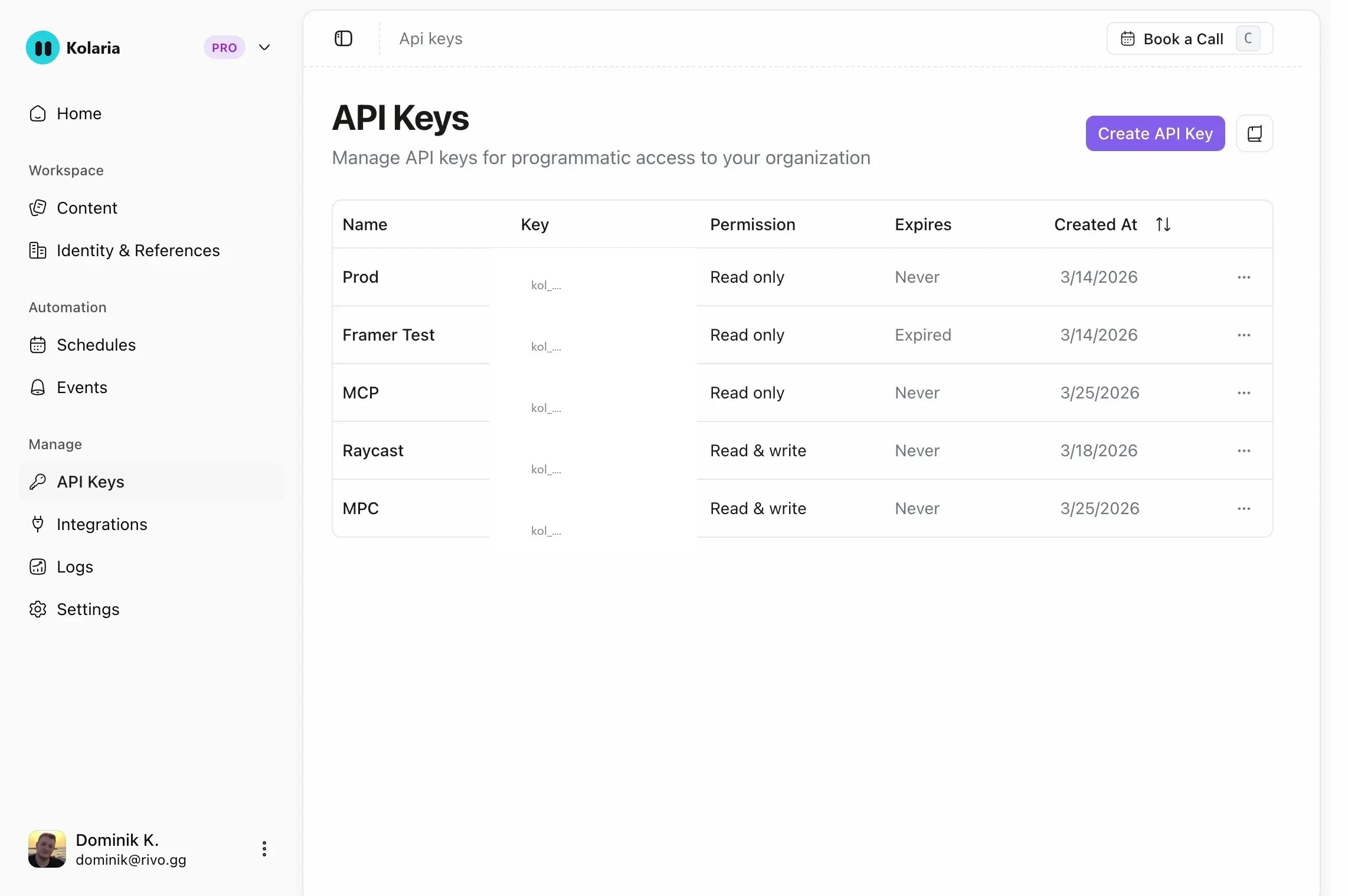
In the [dashboard](https://app.kolaria.com), open **API Keys** at the bottom of the sidebar. The page lives at `app.kolaria.com/{org-slug}/api-keys`.
Pick a name, an expiration (no expiry, 7, 30, 60 or 90 days) and the permissions the key needs. Start from one of the presets (MCP Server, SDK, CLI) or choose **Restricted** to set read or write access per resource.
Keys start with `klra_` and are shown once. Store the value in a server-side environment variable such as `KOLARIA_API_KEY`.
 Scopes, presets and error responses are covered in [Authentication](/api/authentication).
Building a CLI, MCP client or agent that acts for a signed-in user? Use OAuth instead of a pasted key: register a client, run the authorization code flow with PKCE (or the device flow on headless machines), and send the access token in the same `Authorization: Bearer` header. The Kolaria MCP server accepts the same tokens. See [OAuth](/api/authentication#oauth).
Keep API keys private. Even read-only keys can be abused and burn through your
[rate limits](/api/rate-limits) if exposed in client-side code. Make requests
from your backend.
## SDK Installation
```bash npm theme={null}
npm install @usenotra/sdk
```
```bash yarn theme={null}
yarn add @usenotra/sdk
```
```bash pnpm theme={null}
pnpm add @usenotra/sdk
```
```bash bun theme={null}
bun add @usenotra/sdk
```
Initialize the client with your API key:
```typescript theme={null}
import { Kolaria } from "@usenotra/sdk";
const notra = new Kolaria({
bearerAuth: process.env.KOLARIA_API_KEY ?? "",
});
const post = await notra.content.getPost({ postId: "post_abc" });
```
The SDK exposes one namespace per endpoint group: `notra.content`, `notra.schedules`, `notra.eventTriggers`, `notra.chats`, `notra.skills`, `notra.feedback` and `notra.agent`. It is generated from the OpenAPI document and published at [github.com/gsmmediaro/typescript-sdk](https://github.com/gsmmediaro/typescript-sdk).
GEO endpoints (projects, prompts, competitors, scans, visibility, gaps, briefs, agent readiness, traffic) are not in the SDK yet. Call them with `fetch` or generate a client from the OpenAPI document, see [Generate a client](/api/rust-sdk).
## API groups
`GET /v1/status`. Public reachability check plus the authentication discovery metadata agents use to find out how to get a credential.
Posts (list, get, update, delete, queue generation and poll its status), brand identities (list, generate, update, delete) and integrations (list, connect a GitHub repository, remove).
Recurring content generation: list, create, update and delete schedules that turn repository activity into posts on a cadence.
Event-based generation fired by GitHub webhooks: list, create, get, update and delete triggers.
Start a chat and stream the reply, continue an existing chat, list chats, or look a chat up by an external channel id.
Reusable writing skills, addressed by name: list, create, get, update and delete.
Feedback submitted by AI agents. Agents post to your public feedback URL without credentials; list, get and triage entries with an API key. See [Agent Feedback](/api/agent-feedback).
Generative engine optimization per project: settings, tracked prompts and prompt sequences, competitors, scans, visibility reads (mention rates, timeseries, share of voice), content gaps and briefs, agent readiness, AI traffic and the traffic ingest token. Requires a GEO plan.
Durable agent sessions under `/v2`: start a session, send follow-up messages or answer input requests, stream session events, and list sessions.
## Responses and errors
Successful responses are JSON. List and detail responses in the Content and GEO groups also include an `organization` object (`id`, `slug`, `name`, `logo`) describing the organization the key belongs to.
Errors are JSON with an `error` message. Authentication failures add a machine-readable `code` and a `recovery` hint:
```json theme={null}
{
"error": "Invalid API key",
"code": "INVALID_API_KEY",
"recovery": "Send Authorization: Bearer . See https://www.kolaria.com/auth.md for agent credential discovery."
}
```
| Status | When |
| - | - |
| `400` | Validation failed. `error` names the field, for example `limit: Too big: expected number to be <=100`. |
| `401` | Missing, invalid or expired credential (API key or OAuth token). The response also carries a `WWW-Authenticate` header with the OAuth discovery URL. |
| `402` | The organization has no active paid plan or AI credits for a write, or no GEO plan for a GEO endpoint. |
| `403` | The key lacks the scope the endpoint needs. |
| `404` | Resource not found, or an unknown route. |
| `409` | Conflict, for example a duplicate name. |
| `429` | Rate limited. See [Rate Limits](/api/rate-limits). |
| `503` | The authentication or billing service is temporarily unavailable. Retry with backoff. |
## Next Steps
API keys, OAuth, scopes and the exact error envelope.
Copy-paste examples for posts, generation jobs and GEO reads.
Page through posts, feedback and scan history.
Types and Zod schemas for the post endpoints.
Scopes, presets and error responses are covered in [Authentication](/api/authentication).
Building a CLI, MCP client or agent that acts for a signed-in user? Use OAuth instead of a pasted key: register a client, run the authorization code flow with PKCE (or the device flow on headless machines), and send the access token in the same `Authorization: Bearer` header. The Kolaria MCP server accepts the same tokens. See [OAuth](/api/authentication#oauth).
Keep API keys private. Even read-only keys can be abused and burn through your
[rate limits](/api/rate-limits) if exposed in client-side code. Make requests
from your backend.
## SDK Installation
```bash npm theme={null}
npm install @usenotra/sdk
```
```bash yarn theme={null}
yarn add @usenotra/sdk
```
```bash pnpm theme={null}
pnpm add @usenotra/sdk
```
```bash bun theme={null}
bun add @usenotra/sdk
```
Initialize the client with your API key:
```typescript theme={null}
import { Kolaria } from "@usenotra/sdk";
const notra = new Kolaria({
bearerAuth: process.env.KOLARIA_API_KEY ?? "",
});
const post = await notra.content.getPost({ postId: "post_abc" });
```
The SDK exposes one namespace per endpoint group: `notra.content`, `notra.schedules`, `notra.eventTriggers`, `notra.chats`, `notra.skills`, `notra.feedback` and `notra.agent`. It is generated from the OpenAPI document and published at [github.com/gsmmediaro/typescript-sdk](https://github.com/gsmmediaro/typescript-sdk).
GEO endpoints (projects, prompts, competitors, scans, visibility, gaps, briefs, agent readiness, traffic) are not in the SDK yet. Call them with `fetch` or generate a client from the OpenAPI document, see [Generate a client](/api/rust-sdk).
## API groups
`GET /v1/status`. Public reachability check plus the authentication discovery metadata agents use to find out how to get a credential.
Posts (list, get, update, delete, queue generation and poll its status), brand identities (list, generate, update, delete) and integrations (list, connect a GitHub repository, remove).
Recurring content generation: list, create, update and delete schedules that turn repository activity into posts on a cadence.
Event-based generation fired by GitHub webhooks: list, create, get, update and delete triggers.
Start a chat and stream the reply, continue an existing chat, list chats, or look a chat up by an external channel id.
Reusable writing skills, addressed by name: list, create, get, update and delete.
Feedback submitted by AI agents. Agents post to your public feedback URL without credentials; list, get and triage entries with an API key. See [Agent Feedback](/api/agent-feedback).
Generative engine optimization per project: settings, tracked prompts and prompt sequences, competitors, scans, visibility reads (mention rates, timeseries, share of voice), content gaps and briefs, agent readiness, AI traffic and the traffic ingest token. Requires a GEO plan.
Durable agent sessions under `/v2`: start a session, send follow-up messages or answer input requests, stream session events, and list sessions.
## Responses and errors
Successful responses are JSON. List and detail responses in the Content and GEO groups also include an `organization` object (`id`, `slug`, `name`, `logo`) describing the organization the key belongs to.
Errors are JSON with an `error` message. Authentication failures add a machine-readable `code` and a `recovery` hint:
```json theme={null}
{
"error": "Invalid API key",
"code": "INVALID_API_KEY",
"recovery": "Send Authorization: Bearer . See https://www.kolaria.com/auth.md for agent credential discovery."
}
```
| Status | When |
| - | - |
| `400` | Validation failed. `error` names the field, for example `limit: Too big: expected number to be <=100`. |
| `401` | Missing, invalid or expired credential (API key or OAuth token). The response also carries a `WWW-Authenticate` header with the OAuth discovery URL. |
| `402` | The organization has no active paid plan or AI credits for a write, or no GEO plan for a GEO endpoint. |
| `403` | The key lacks the scope the endpoint needs. |
| `404` | Resource not found, or an unknown route. |
| `409` | Conflict, for example a duplicate name. |
| `429` | Rate limited. See [Rate Limits](/api/rate-limits). |
| `503` | The authentication or billing service is temporarily unavailable. Retry with backoff. |
## Next Steps
API keys, OAuth, scopes and the exact error envelope.
Copy-paste examples for posts, generation jobs and GEO reads.
Page through posts, feedback and scan history.
Types and Zod schemas for the post endpoints.